
Most coupon codes that “don’t work” are real codes being used outside their terms. The usual reasons are that the code has expired, it is for new customers only, it covers a different plan or billing period from the one in your cart, or another discount is already applied and the shop allows only one. A typo or a stray space accounts for most of the rest.
This guide walks through each reason in the order worth checking, shows what real merchant terms look like, and explains what to do when a code still fails.
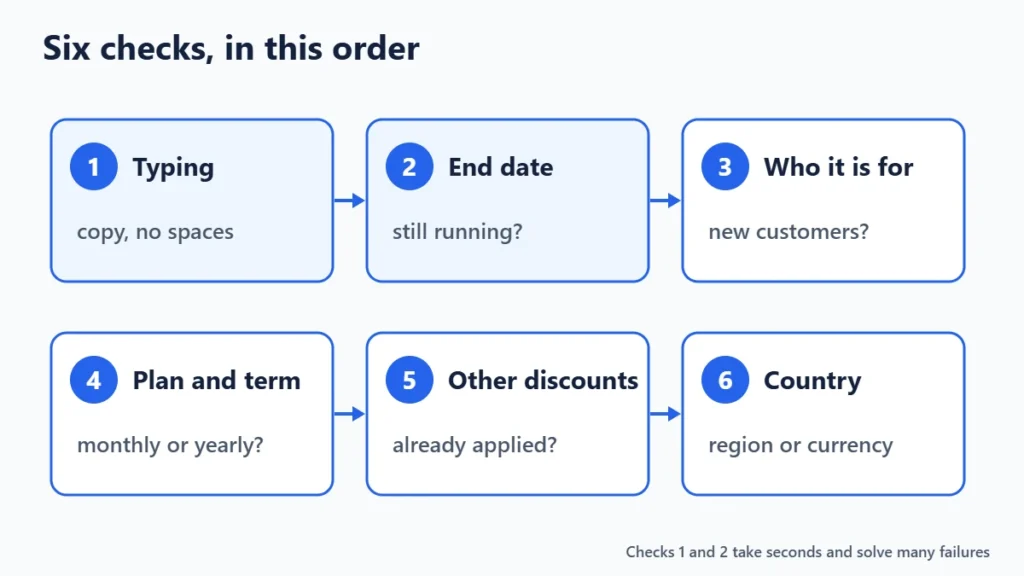
The Quick Answer: Check These Six Things First
- Typing: copy the code instead of typing it, and remove any space before or after it.
- Dates: check that the offer has not ended. Many sales end at midnight in the merchant’s time zone, not yours.
- Who it is for: look for “new customers only” or “first order only”.
- What it covers: check the plan, product and billing period the code applies to.
- Other discounts: see whether a sale price, referral discount or another code is already in your cart.
- Where you are: check for country or currency limits.
1. A Typo, a Space or the Wrong Box
Checkout forms usually compare the code letter for letter. A trailing space copied from an email, a zero typed as the letter O, or a missing hyphen is enough for a rejection. Some forms ignore capital letters and some do not, so keep the code exactly as published.
Also check which box you are using. Software and hosting checkouts often hide the field behind a link such as “Have a coupon code?”, and some put it on the signup form rather than the payment page. Cloudways, for example, takes its promo code in the signup form, before the account exists, and Winporter’s Cloudways store page notes that it cannot be added to an existing account afterwards.
2. The Offer Has Ended
An expired code is the most common reason of all, especially on pages that copy codes from elsewhere and never remove them. Check the end date if one is shown, and treat any code with no date and no recent check with caution.
Sale periods cause a second problem: some merchants announce a “limited-time” offer without publishing an end date. Winporter’s Surfshark and Proton VPN pages say exactly that about their Black Friday deals. In that case the only reliable test is whether the price still shows on the merchant’s own site today.
3. It Is for New Customers Only
Introductory discounts are usually limited to a first purchase. If you have had an account before, even a free one, the code may be refused. Of the offers Winporter lists, those for Cloudways, Kinsta, WP Engine, Proton VPN, Namecheap and Semrush are all marked for new customers.
The same rule usually means a code will not work on a renewal. Hostinger’s 20% code on the Hostinger store page, for instance, covers the first billing term of a new purchase and is “not valid on renewals or existing services”. If your cart is a renewal or an upgrade, that is very likely the reason.
4. The Plan, Product or Billing Period Does Not Match
This is the reason people miss most often, because the code looks right and the shop is right, but the cart is not what the code covers. Software and hosting offers are often tied to one billing period.
| Store | What the offer covers | Where it would fail |
|---|---|---|
| WPX Hosting Black Friday deal, no code | 90% off the first month of WordPress hosting on monthly billing | A yearly or multi-year plan |
| FlyingHost 2 months free | Plans billed yearly | Monthly billing |
| ServerAvatar | 25% off plus 2 months free on yearly plans; 15% off monthly | Expecting the yearly discount on a monthly plan |
| Hostinger extra 20% code | First billing term of any new plan | Renewals and existing services |
If the code is rejected, read its terms and switch the cart to the plan and term it names. Then compare the total with what you would pay without the code, because the cheapest code is not always the cheapest plan. Our guide to monthly vs annual billing shows how to compare them.

5. Another Discount Is Already Applied
Most shops allow one code per order, and many treat a sale price or an automatic referral discount as that one code. Namecheap’s domain and hosting bundle, for example, cannot be combined with other Namecheap discounts or promotions, according to the terms on our Namecheap page.
Sometimes the discount you want is already there. When you open Hostinger through the link on its store page, the extra 20% is applied automatically and appears in the cart as REFERRALDISCOUNT; typing the code again then has nothing left to add. Before entering a code, look at the order summary for a discount line you did not type.
Stacking, using two codes on one order, almost never works on software and hosting checkouts. Where a merchant does allow it, the terms say so explicitly.

6. Country, Currency or Minimum Spend
Some codes are limited to certain countries, or only work when the cart is priced in one currency. Others need a minimum order value or a minimum term. If you are using a VPN while shopping, the shop may show you prices and offers for another country. Turning it off for checkout, or choosing your own country in the shop’s region selector, can bring the right offer back.
7. The Code Was Never Real
Some coupon pages list codes that nobody has checked, or that were made up to attract clicks. Signs to watch for: dozens of codes for one shop with no dates, a “100% success rate” shown without any count of reports, and codes revealed only after you click through to the merchant.
Winporter labels every offer with what was checked and when. “Verified” means an editor applied the code at the merchant’s checkout; “Checked” means the offer was confirmed on the merchant’s own site, email or affiliate feed without a checkout test. Our verification method explains every label, and offers leave the active list when they end or fail.

What to Do When the Code Still Fails
- Clear the cart and start again from the merchant’s own site, with the right plan and term selected first.
- Try a private browser window so an old cart, saved session or browser extension does not interfere.
- Look for a code-free deal. Many software discounts are built into the price and need no code at all; our deals list shows only those.
- Ask the merchant’s support before paying. Support teams can often confirm whether an offer is still running or apply it manually.
- Do not pay the full price hoping to claim the discount later. Most shops do not add codes to completed orders.
- Tell us. If a code from Winporter fails, answer “Did this code work?” on its store page or use our corrections page, so it can be rechecked.
Frequently Asked Questions
Why does my coupon code say it is invalid?
“Invalid” usually means the shop does not recognise the code at all: it has been typed incorrectly, it has expired and been deleted, or it never existed. “Not applicable” or “not eligible” usually means the code is real but your cart, account or country does not meet its terms.
Can I use a coupon code on a renewal?
Rarely. Most software and hosting codes apply only to the first term of a new purchase, and renewals are charged at the normal price. Check the renewal price before you buy, not after.
Can I use two promo codes at once?
Usually not. Most checkouts accept one code per order and count automatic sale or referral discounts as that code.
Is a coupon code the same as a promo code?
For shoppers, yes. Coupon code, promo code, discount code and voucher code are different names for the same thing: a word you enter at checkout to change the price.
Why did the code work for someone else but not for me?
Personal conditions are the usual reason: the other person was a new customer, chose a different plan or term, was in a different country, or used the code before it ended.
The Bottom Line
When a code fails, check it in this order: typing, end date, new-customer rule, plan and billing period, other discounts, and country. Reading the offer’s terms before you start checkout saves most of the trouble. Browse all stores on Winporter to see each offer’s terms, its label and the date it was last checked.
