
The checkout total is usually higher than the advertised price for one of five reasons: the price was a monthly figure for a term you pay upfront, tax has been added, add-ons are in the cart, the plan is priced per site or per user, or the discount needs a different plan or billing period. None of these is necessarily a trick, but each can double the figure you expected.
This guide explains each cause with real terms from hosting, VPN and software merchants listed on Winporter, and gives a quick check to run before you pay.
The Five Usual Causes

1. The monthly price is for a term you pay upfront
Long-term hosting and VPN prices are usually shown per month and charged for the whole term on day one. Hostinger’s plans, for example, are paid upfront for the whole term, with the monthly figure being the total divided by the months, according to our Hostinger page. Its KVM 1 VPS at $6.49/mo is $155.76 for 24 months. Surfshark’s $2.49/mo Black Friday price is $67.23 for 27 months, plus tax, per our Surfshark page.
Multiply the monthly figure by the months in the term to see the real charge. Our guide to monthly vs annual billing covers when the upfront term is worth it.
2. Tax is added at checkout
Many merchants show prices without tax. Bluehost’s prices exclude tax, “which depends on your country”, and Hostinger and Surfshark also quote prices without tax, according to our Bluehost, Hostinger and Surfshark pages. What gets added depends on where you live:
- In the European Union, VAT on digital services is normally charged at the rate of the country where the customer lives.
- Many other countries, including the UK and India, also tax online services sold to consumers.
- In the United States, whether sales tax applies to software or hosting depends on the state.
The checkout calculates tax from your billing address, so the total only becomes final once you enter it.
3. Add-ons are in the cart
Checkout pages often offer extras: domain privacy, backups, security tools, email, SEO tools. Some are useful, some are already included in the plan, and some are ticked by default. Hosting.com’s Marketing Suite add-on, for example, is offered at 50% off and added at checkout during its sale, according to our Hosting.com page. Before paying, read each line in the order summary and remove anything you did not choose.
4. The price is per site, per user or per unit
Some plans are priced for one site or one person, and the total rises with each one you add:
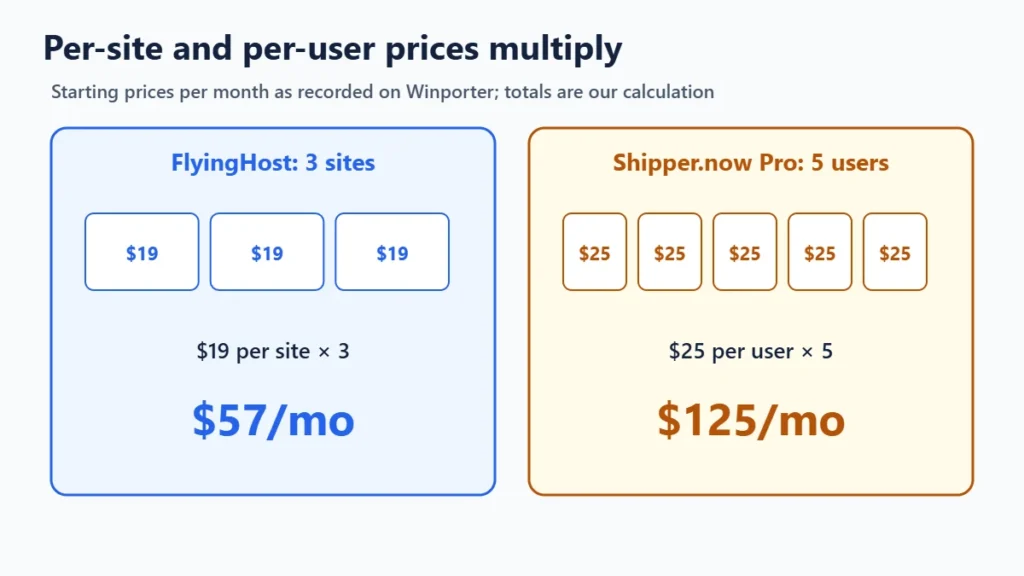
- FlyingHost plans start at $19/month per site, per our FlyingHost page.
- WP Engine charges $20 (USD) per month for each additional site, per our WP Engine page.
- Shipper.now’s Pro plan is $25 per user per month, per our Shipper page.
- SEOPress Insights is $99 a year per site, per our SEOPress page.
For three sites or five users, multiply before comparing plans.
5. The discount needs a different plan or term
Discounts are often tied to one billing period. If you change it at checkout, the discount may disappear. Verpex’s 90% off, for example, covers the first month on monthly billing, after which the normal price applies, according to our Verpex page. If the total jumps after you change the term, the discount probably did not carry over. Our guide on why coupon codes fail covers this in more detail.
Other Things That Raise the Total
- Currency. Some merchants price in your local currency, as MilesWeb does according to our MilesWeb page. Others charge in US dollars, and your bank may add a foreign transaction fee or use its own exchange rate.
- Usage beyond the plan. FlyingHost charges $5 per 100 GB of extra CDN bandwidth, and bunny.net bills by usage, according to our FlyingHost and bunny.net pages. These charges come later, not at checkout, but they belong in the real cost.
- “Free” items with a time limit. Free domains usually last only the first year. Namecheap’s bundle discount is a first-year offer, and Strikingly’s free domain comes with a yearly plan, per our Namecheap and Strikingly pages.

Read the Order Summary Line by Line
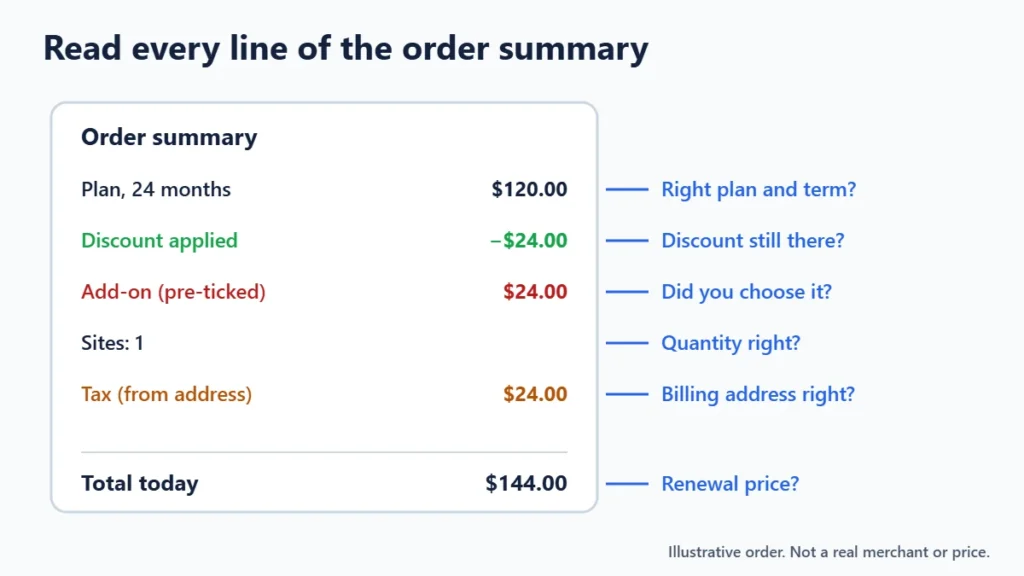
- Plan and term: is it the plan and billing period you chose?
- Discount line: is the sale or code actually applied?
- Add-ons: did you choose every extra in the cart?
- Quantity: number of sites, users or licences.
- Tax: based on your billing address.
- Total today and renewal: what you pay now, and what you will pay later.
Frequently Asked Questions
Why is the price at checkout different from the website?
Usually because the website shows a monthly figure before tax, while checkout shows the full term with tax and any add-ons. Check each line of the order summary to see which one caused the difference.
Is it legal to add tax at checkout?
Showing prices before tax is common for business and international services, and the rules depend on the country. Either way, the total should be shown before you pay.
How do I avoid unwanted add-ons?
Untick any pre-selected extras and check the order summary before paying. Many features, such as SSL or backups, are already included in some plans.
Why did my discount disappear at checkout?
Most often because you changed the plan or billing period, or the discount was for new customers only. Go back and select the exact plan and term the offer names.
The Bottom Line
The advertised price is a starting point. Before you pay, multiply by the term, add tax for your country, remove add-ons you did not choose, multiply by sites or users, and confirm the discount is still applied. Each store on Winporter notes upfront charges, tax treatment and extra costs where the merchant states them.
