Do I need to pay for an SSL certificate? For most websites, no: the free SSL certificate your host includes is enough. A free certificate from Let’s Encrypt encrypts the connection exactly as a paid one does, and every one of the 15 hosts in the table below says its plans include free SSL. Paying makes sense only when you need your organisation’s identity checked and written into the certificate (OV or EV), a type your host’s free certificate does not cover, or the support and warranty a certificate seller offers.
This guide explains what a paid certificate adds, what it costs, why certificate lifetimes are getting shorter for paid and free certificates alike, and how to spot an SSL add-on you don’t need at checkout.
Key takeaways
- Free and paid certificates use the same encryption. The difference is how much the issuer checks about who you are.
- Let’s Encrypt, the free certificate most hosts install, issues Domain Validation (DV) certificates only and charges nothing.
- No public SSL certificate issued on or after 15 March 2026 can be valid for more than 200 days, paid or free. A “5-year” purchase is a subscription that re-issues certificates.
- Chrome no longer shows an EV company name in the address bar, and replaced the padlock with a neutral icon in 2023.
- Before you pay for an SSL add-on, check whether your plan already includes one. Namecheap’s free shared-hosting certificate is for one year, so note when that ends.
What a Free SSL Certificate Gives You
An SSL certificate (technically a TLS certificate) lets a browser set up an encrypted HTTPS connection to your site and confirms the certificate was issued for your domain. That is all most sites need: an HTTPS address with no “Not secure” warning, and protection for logins and form data in transit.
Let’s Encrypt is the free certificate authority behind most hosts’ free SSL. It is run by the nonprofit Internet Security Research Group, and its FAQ says: “We do not charge a fee for our certificates.” It issues Domain Validation certificates only (“We have no plans to issue OV or EV certificates”) and supports free wildcard certificates through a DNS check. Hosts install and renew these certificates automatically.
Hosts That Include Free SSL
Every host below says on its own website that SSL comes with the plan. Click a host to see its current offers on Winporter.
| Host | What its own site says |
|---|---|
| Hostinger | “Unlimited free SSL” on its web hosting plans |
| Bluehost | “Free SSL- Let’s Encrypt” on every shared plan; also sells paid DigiCert certificates |
| Namecheap | “50 free Standard SSL certificates for one year” on shared hosting |
| Cloudways | “Free SSL” listed in its plan features |
| Kinsta | free SSL with “full support for wildcard domains” |
| WP Engine | “Free SSL and SSH” on its plans |
| ChemiCloud | “Free SSL Certificate” on its web hosting plans |
| FastComet | “you get a free SSL certificate” |
| HostArmada | “Free SSL” on shared and WordPress hosting |
| ScalaHosting | “Free SSL Certificates” |
| Verpex | “free SSL” on its hosting plans |
| hosting.com | “Free SSL Certificate” on its plans |
| UltaHost | “Free SSL Certificate(s)” |
| WPX Hosting | “Free SSL Certificates” |
| Pressable | “We include SSL Certificates with every site hosted on Pressable.” |
Free SSL is so standard that a plan without it is the exception. If your host charges for a basic certificate, Cloudflare’s free plan also issues free certificates (Universal SSL) for domains you add to it. That certificate covers the connection between visitors and Cloudflare; in Cloudflare’s “Flexible” mode the connection from Cloudflare to your server stays unencrypted. To encrypt that part too, install a certificate on your server (Cloudflare’s Origin CA certificates are available on the free plan) and use Cloudflare’s Full (strict) mode.

What Paid SSL Certificates Cost
Paid certificates are sold by validation level (DV, OV or EV) and by coverage (one domain, several domains, or a domain plus all its subdomains). Two examples from 18 November 2026:
Namecheap: certificates sold on their own
| Certificate | Validation | Covers | 1-year term | 5-year term |
|---|---|---|---|---|
| Standard SSL | DV | 1 domain | $11.00 (renews $13.20) | $5.99/yr (renews $6.99/yr) |
| Standard Wildcard SSL | DV | 1 domain + subdomains | $89.99 (renews $99.89) | $39.99/yr (renews $44.39/yr) |
| High Assurance SSL | OV | 1 domain | $35.99 (renews $43.19) | $19.99/yr (renews $23.99/yr) |
| EV SSL | EV | 1 domain | $76.99 (renews $92.39) | $45.99/yr (renews $55.19/yr) |
Bluehost: paid add-ons next to the free certificate
| Add-on | Validation | Price shown | 12-month term at that price |
|---|---|---|---|
| Single Domain DV SSL | DV | $3.33/mo to $7.49/mo first term; renews at $7.49/mo | $39.96 to $89.88 |
| Wildcard DV SSL | DV | $19.99/mo, renews at $19.99/mo | $239.88 |
| Extended Validation SSL | EV | $19.99/mo, renews at $19.99/mo | $239.88 |
Bluehost’s page also says: “A free Let’s Encrypt SSL certificate is included with all Bluehost hosting plans.” So a basic DV add-on at about $40 to $90 a year buys the same validation level you already have for free. What it adds, according to Bluehost’s page, is DigiCert as the issuer, a $10,000 warranty, a site seal and support.

What You Actually Get for the Money
Identity checks (OV and EV)
An Organization Validation (OV) or Extended Validation (EV) certificate means the issuer checked that your organisation exists and put its name in the certificate. Some companies, banks and procurement teams require this. Visitors rarely see it: Chrome moved the EV company name out of the address bar in version 77 (2019), and in Chrome 117 (2023) it replaced the padlock with a neutral “tune” icon. Google’s reason: in its research, “only 11% of study participants” understood what the lock meant, and “the lock icon does not indicate website trustworthiness”.
Warranty
Bluehost’s add-ons carry warranties from $10,000 (DV) to $1,750,000 (EV). Read what a warranty covers. DigiCert’s terms describe a relying-party warranty for visitors who “suffer damage due to a certificate being improperly issued” and state that it “is not a warranty to you as the Subscriber”. It does not pay the site owner if the site is hacked.
Coverage and support
Wildcard and multi-domain certificates cover many names with one certificate. Some hosts include wildcard coverage free (Kinsta says its free certificates fully support wildcard domains); others do not on every plan, so ask your host before buying one. Paid sellers also offer support and installation help, which matters most on servers you manage yourself.
Certificates Are Getting Shorter, Paid or Free
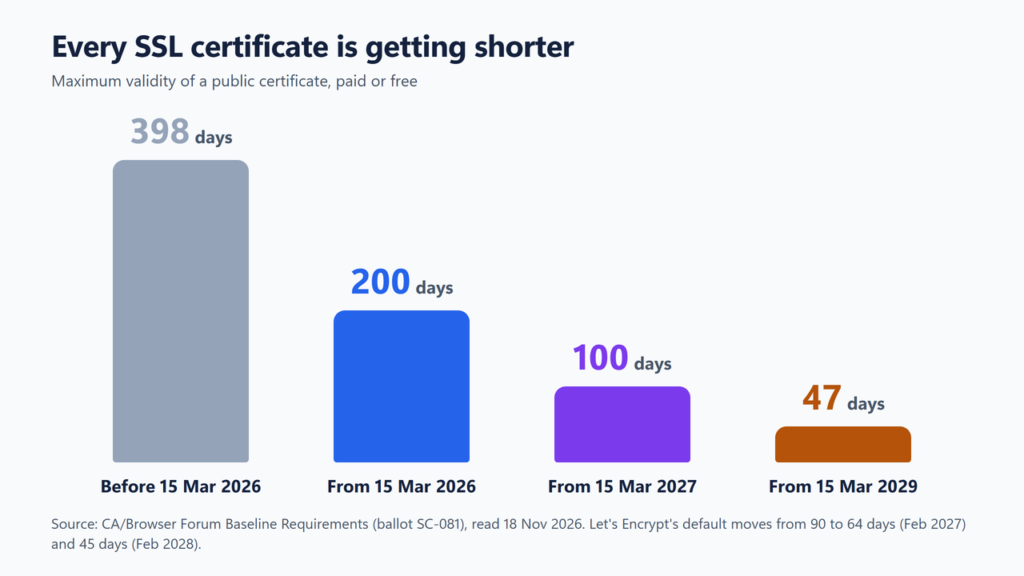
The CA/Browser Forum, the industry body whose Baseline Requirements every public certificate authority must follow, passed ballot SC-081 in 2025. It cuts the maximum life of every public SSL certificate, paid or free:
| Certificates issued from | Maximum validity |
|---|---|
| 15 March 2026 | 200 days |
| 15 March 2027 | 100 days |
| 15 March 2029 | 47 days |
Let’s Encrypt is shortening its default 90-day certificates too: to 64 days on 10 February 2027 and 45 days on 16 February 2028 (an opt-in 45-day option started on 13 May 2026).
Two things follow. A paid “multi-year” certificate is now a subscription: you pay for several years, and the seller re-issues a certificate at least twice a year, and about four times a year once the 100-day limit starts on 15 March 2027. DigiCert, for example, has issued 199-day certificates since 24 February 2026. And automatic renewal matters more than price. On a hosting plan this is handled for you. On your own server, set up automatic renewal: Let’s Encrypt stopped sending expiry reminder emails on 4 June 2025.
When Paying for SSL Makes Sense
- A contract, policy or client requires OV or EV. Free public certificates (Let’s Encrypt, Cloudflare) are DV only.
- Your host’s free certificate doesn’t cover your setup, for example a wildcard on a plan that doesn’t include one. Ask the host before buying.
- You run your own server and want vendor support or cannot automate renewals. Automating renewals is still the better fix, because certificates now expire in months, not years.
- You want the seller’s warranty or site seal for its own sake, knowing the warranty protects visitors in a mis-issuance, not your business.
How to Avoid Paying for SSL You Don’t Need
- Check the plan’s feature list for “free SSL” before you add a certificate in the cart.
- Untick pre-selected security or SSL add-ons, and compare the cart total before and after. Our guide to why the price is higher at checkout covers other add-ons.
- If a free certificate is for a limited time (Namecheap’s is one year), note the date and check the renewal price in your account.
- If you already pay for a certificate your host would give you free, turn off its auto-renewal before the next term. See how to turn off auto-renewal.
- Count SSL in the total cost of a plan, alongside the renewal price: see web hosting renewal prices.
To see which certificate your site has now, click the icon to the left of your address in the browser and open the certificate details: they show the issuer and the expiry date.

Frequently Asked Questions
Is a free SSL certificate safe?
Yes. A free Let’s Encrypt certificate gives the same encryption as a paid one (the strength depends on your server’s settings, not on the price) and is trusted by all major browsers. What it does not do is verify your organisation’s identity; it only confirms control of the domain. Free public certificates (Let’s Encrypt, Cloudflare) are Domain Validation only.
Does a paid SSL certificate help SEO?
We found no Google statement saying so. Google calls HTTPS “only a very lightweight signal”, and its 2014 announcement told site owners to choose a certificate by coverage (“single, multi-domain, or wildcard”) without mentioning OV or EV.
Do I need a paid SSL certificate for an online store?
Not by default. Use HTTPS on every page and keep the certificate valid. The PCI wording we checked asks for strong cryptography and valid certificates, not a particular validation level. Card details are usually entered on your payment provider’s own secure form.
What happens when a free SSL certificate expires?
On a hosting plan it is renewed automatically before it expires. If renewal fails, visitors see a security warning, so check your host’s SSL page if one appears. Since free reminder emails from Let’s Encrypt ended in June 2025, self-managed servers need working automatic renewal.
Can I get a free wildcard certificate?
Yes. Let’s Encrypt issues free wildcard certificates, but only with a DNS-based check, which some hosts do not automate on every plan. Kinsta says its free certificates support wildcard domains.
The Bottom Line
Start with the free certificate your host includes. Pay only for a specific reason: an identity check someone requires, a coverage gap your host confirms, or support you need on your own server. When you do pay, compare the renewal price and remember that a multi-year certificate now means regular re-issues. Browse hosting stores on Winporter to see each host’s current offers and terms, and read what managed WordPress hosting costs if you are comparing higher-end plans.
Sources checked on 18 November 2026: Let’s Encrypt’s FAQ and blog posts on 45-day certificates and the end of expiry emails; the CA/Browser Forum Baseline Requirements and ballot SC-081; DigiCert’s documentation on 199-day certificates and its Web PKI terms; the Chromium blog and Chromium security-dev group on the lock icon and EV; Google Search Central’s “HTTPS as a ranking signal” post; the PCI DSS v4.0 SAQ D for merchants and the PCI Security Standards Council document library; Namecheap’s SSL, .com and shared hosting pages and blog; Bluehost’s SSL and web hosting pages; Cloudflare’s Universal SSL, SSL modes and Origin CA documentation; and the websites of the hosts in the table.
