The most reliable coupon codes come from the merchant itself: its pricing and sale pages, its newsletter, its signup offers and its partner links. Coupon sites help when they show when and how each code was checked. And for many online services you do not need a code at all, because the discount is already built into the price.
This guide covers where to look, in the order most likely to work, what to avoid, and how to check a code before you pay.
Start Here: You May Not Need a Code
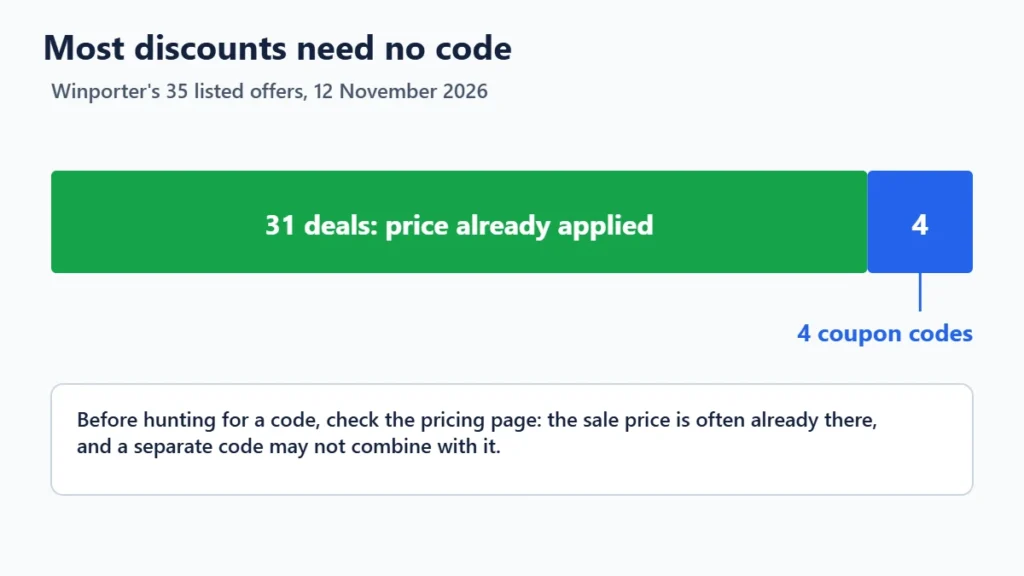
Before searching for a code, check whether the merchant already applies the discount. Of the 35 offers Winporter listed on 12 November 2026, 31 needed no code: the sale price was already on the merchant’s pricing page or applied when you chose a plan and term. HostArmada, FastComet and MilesWeb, for example, apply their sale prices automatically, according to our HostArmada, FastComet and MilesWeb pages.
If the price you see already includes a large introductory discount, a separate code may not exist, or may not combine with the sale. Our guide to why coupon codes fail explains why.
Where to Find Real Coupon Codes
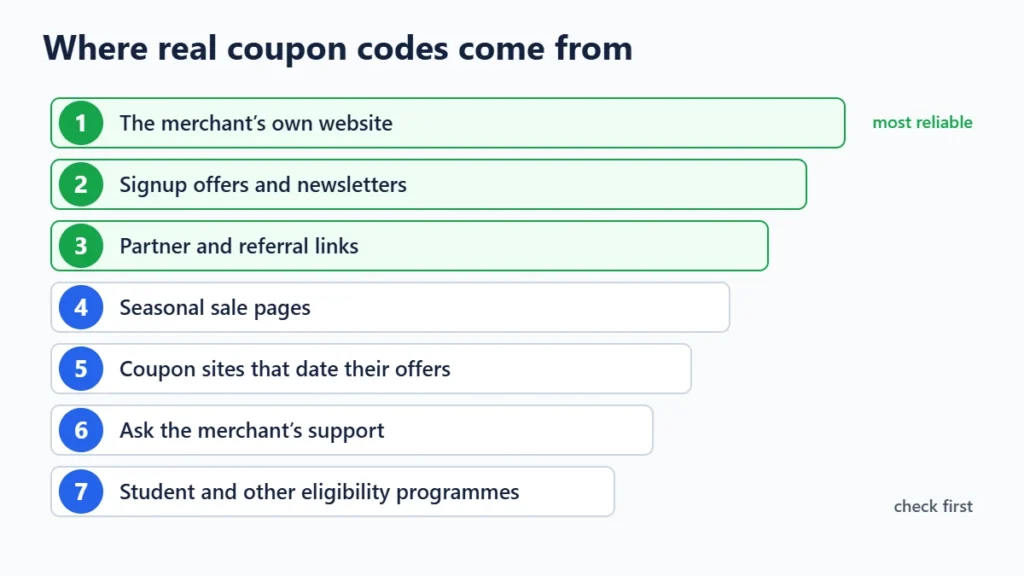
1. The merchant’s own website
Look at the pricing page, any banner across the top of the site, and pages named “deals”, “offers” or “promotions”. Some merchants publish their codes openly. Perfmatters advertises PERFMATTERS for an extra 10% off on its own site, according to our Perfmatters page.
2. Signup offers and newsletters
Many shops offer a first-order discount for joining their email list, and send codes to subscribers during sales. Use an address you are happy to receive marketing at, and unsubscribe afterwards if you want.
3. Partner and referral links
Some discounts are attached to a link instead of a code. Opening Hostinger through the link on our Hostinger page applies a 20% partner discount automatically, and the link on our Cloudways page opens the signup form with the promo code already filled in. These are legitimate: the merchant created them for partners to share.
4. Seasonal sale pages
Black Friday, Cyber Monday and anniversary sales usually have their own landing page on the merchant’s site, often with prices lower than any code. Check whether a code stacks on top before relying on one.
5. Coupon sites that show their working
A good coupon site saves you the search, if each offer shows when it was checked, how it was checked and what its terms are. Our guide to whether coupon sites are legit explains what to look for, and our How we verify page sets out Winporter’s own labels.
6. Ask the merchant
Before you buy, ask the sales or support team whether there is a current promotion. They can tell you whether a sale is still running, which term gets the lowest price, and whether any offer is available that is not on the homepage.
7. Eligibility programmes
Students, teachers, non-profits and start-ups are often eligible for discounts through programmes on the merchant’s site. They usually need proof of eligibility, so check the requirements before you count on one.
What to Avoid
- “Code generators” that claim to create working codes. Merchants create codes; nobody else can.
- Codes shared from private sources, such as an employee, influencer or single-customer code. Merchants often cancel these, and using them can break the merchant’s terms.
- Digging through a website’s code to find hidden coupons. What you find is usually test data or expired, and it may break the site’s terms of use.
- Sites that make you install something or hand over a phone number to see a code.
- Extensions you do not need. A browser extension that reads every page you visit can see a great deal; install only ones you trust, and check their permissions.

How to Check a Code Before You Pay
- Read the terms first: new customers only, which plans, which billing period, which countries, and the end date.
- Set up the cart to match, with the right plan and term selected.
- Apply the code and look for a discount line in the order summary.
- Compare the total with the price you would pay without the code, because a code on a short term can cost more than a code-free sale on a longer one.
- Check the renewal price before you pay. Most codes cover only the first term.

Frequently Asked Questions
How do I find a coupon code for any website?
Check the merchant’s own site first, including its pricing and deals pages and any newsletter or signup offer. Then look for partner links and coupon sites that date their offers. If nothing turns up, ask the merchant’s support team.
Why can’t I find a coupon code for a site?
Many online services do not use codes. Their discounts are built into the price for longer terms or during sales, so the lowest price may already be on the pricing page.
Are coupon codes from coupon sites real?
Some are and some are not. Trust codes that show when they were last checked and how, and treat undated codes with caution.
Is it legal to use a coupon code I found online?
Using a code that a merchant has published or shared with partners is normal. Codes meant for a specific person or group may break the merchant’s terms, and the merchant can cancel the discount.
Can I combine a coupon code with a sale?
Sometimes. Hostinger’s partner discount, for example, applies on top of its sale prices, according to our Hostinger page. Many merchants allow only one discount, so check the terms.
The Bottom Line
Start with the merchant: its pricing page, sale pages, newsletter and partner links produce the codes that actually work, and often show that no code is needed. Use coupon sites that date and explain their offers, skip anything that asks you to install software, and always compare the final total before you pay. Browse Winporter’s stores to see which merchants use codes and which apply discounts automatically.
